Room assignment for groups: place large groups with a few clicks 2026-10-03
For property operators, group travel
A school trip with 100 people arrives, and everybody needs a bed in huts, tents or rooms. So far that meant assigning room after room, each time picking the number of people, accommodation, room and gender. The automatic assignment was faster, but it liked to spread the group over the whole site or to mix areas that do not belong together. The new room assignment solves both.
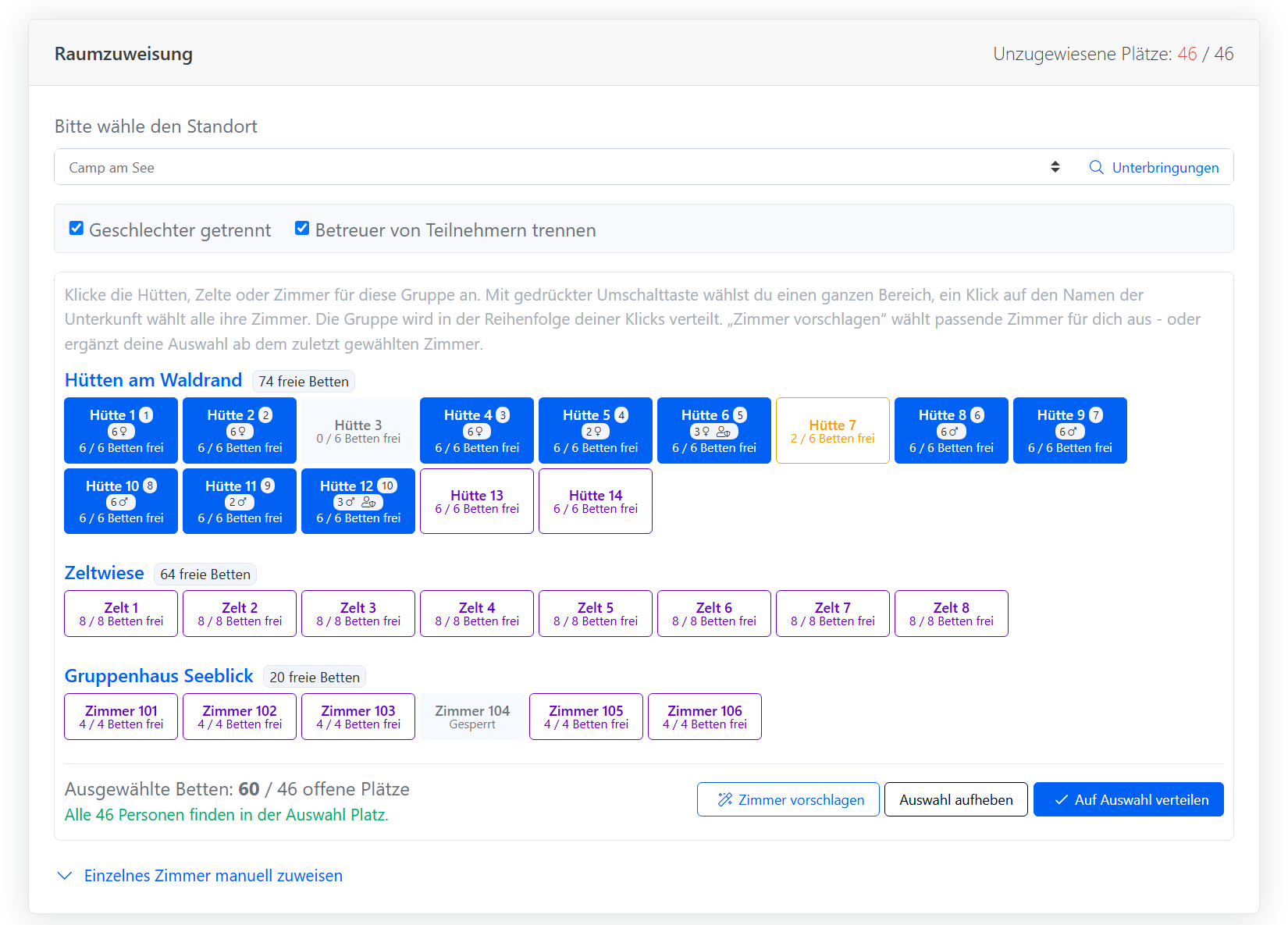
Every accommodation as a tile
In the room assignment of a group you see every sleeping room of the location as a tile, grouped by accommodation and sorted the way they stand on site. Each tile shows the free beds during the group's stay. Full and blocked rooms are greyed out, partly occupied rooms are highlighted.
- A click picks a hut, a tent or a room.
- With the shift key you pick a whole range, for example hut 1 to hut 12.
- A click on the accommodation name picks all of its rooms.
The group is placed in the order of your clicks. That way it ends up exactly in the accommodations next to each other instead of being scattered across the site.
Let Bookacamp suggest rooms
It gets even faster with Suggest rooms. Without a selection, Bookacamp suggests suitable rooms of the booked accommodation. If you already picked a room, the suggestion adds the next free neighbouring rooms from there until everybody fits. Rooms where other guests already sleep are left out. For a large group three clicks are enough: first hut, Suggest rooms, Assign to selected rooms.
See who sleeps where before saving
With every change of the selection Bookacamp calculates the distribution in advance. Each picked tile shows how many people move in and whether they are girls, boys or supervisors. Below, you see whether everybody fits or who is still left without a bed.
This matters because gender separation and separate supervisor rooms need whole rooms: a single female supervisor takes a hut on her own, even if it has six beds. Enough free beds therefore does not mean everybody fits. The preview shows you before you save, and you can add rooms or turn off a separation.
Special cases stay possible
For exceptions there is still the manual assignment of a single room with a fixed number of people and gender, for example two teachers in a particular room or a seminar room. It folds out below the tiles.
The automatic assignment, for example from the occupancy scheduler, got smarter as well: when a group needs several rooms, it fills free neighbouring rooms one after another instead of always the biggest ones first. It no longer uses seminar, sports or kitchen rooms, and rooms with other guests only come into play once no free ones are left.
Author: Mathias Methner